
For First-Time Users
- vLUWNsCd8K
- Getting Started
-
We’re part of the Hobonichi Online Store, a little shopping street inside the Hobonichi website.
Here, you’ll find the Hobonichi Techo along with stationery and lifestyle items that pair perfectly with your planner.
- QcP0qGZ4lv
- Release Date Information
-
The Hobonichi Techo lineup has
two launch dates every year.
Hobonichi Techo 2027 Release Dates
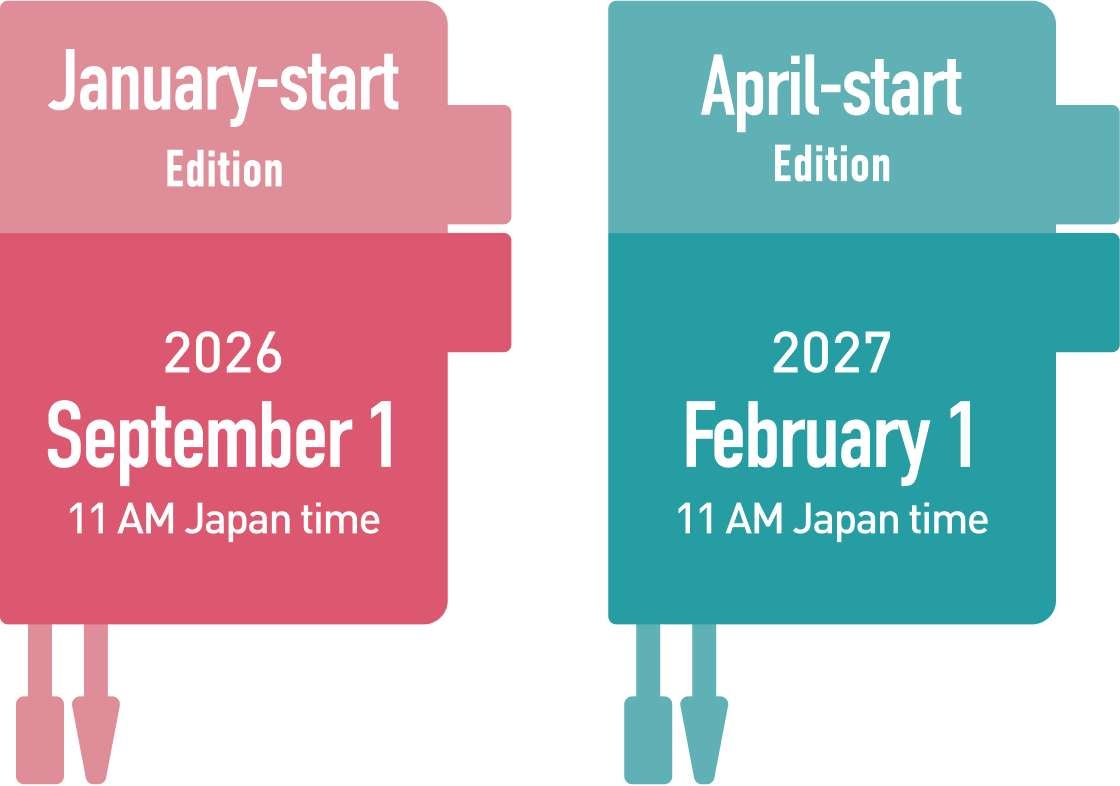
*Some products begin sales on October 1st.
- U5hVE1lxbn
- About the Hobonichi Online Store
-
The Hobonichi Online Store is a shopping website that sells various original products on the “Hobonichi” website operated by Hobonichi Co., Ltd.

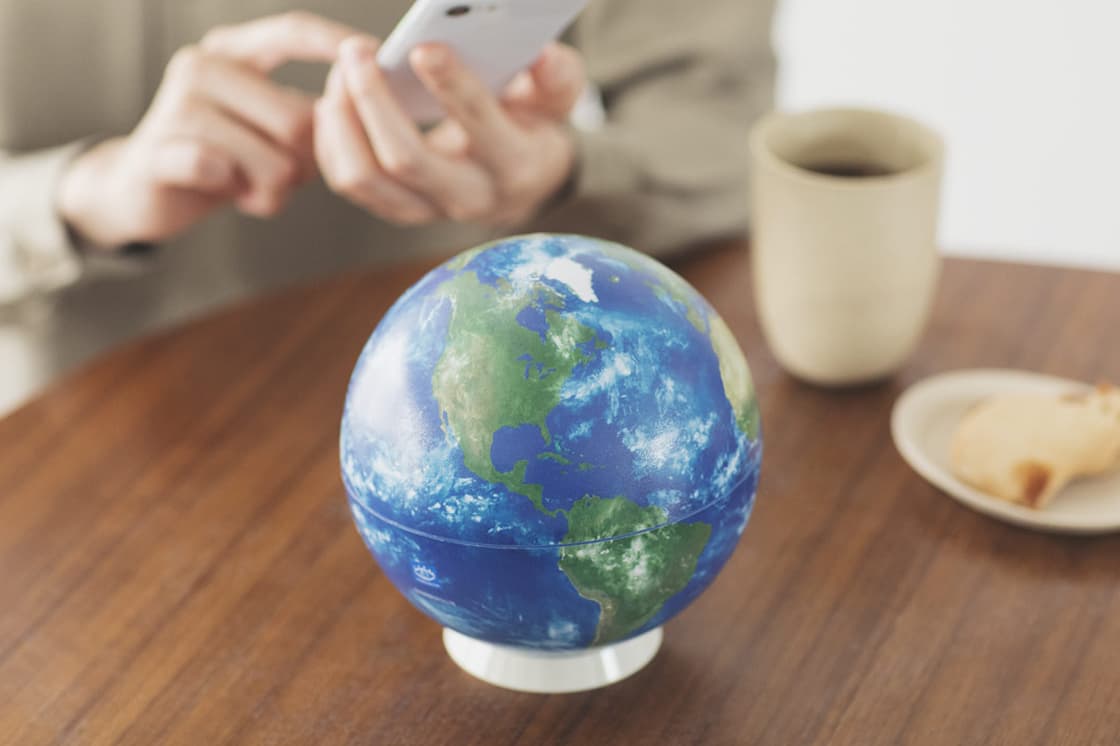
In addition to the Hobonichi Techo, we carry a variety of products that make everyday life more enjoyable, such as Yasashii Towels, Hobonichi Haramaki, Curry No Ongaeshi, and the Hobonichi Globe.
Items sold at the Hobonichi Store can be purchased together with the Hobonichi Techo. If you’re interested, please take a look at the other items along with the Hobonichi Techo.
(Hobonichi ID)
Sign Up (Hobonichi ID)
- wfPIntAvLK
- About the Hobonichi ID
-
The Hobonichi ID is an account service that allows access to several services across Hobonichi.
You will need to register for a Hobonichi ID when making a puchase. We recommend making an account in advance so you can log in before shopping and complete your purchase smoothly with the click of a single button, “Continue with Hobonichi ID.”You can choose from the following login methods:
- Email address and password
- Continue with Apple
- Continue with Google
See here to register a new Hobonichi ID
See here for more information about Hobonichi ID
- tAa3fwFbix
- If you are shopping with us for the first time
- szBHklGtUA
- If you have not yet switched to a Hobonichi ID
-
If you last used the Hobonichi Online Store before July 1, 2024, please update your old Hobonichi Store account to a new Hobonichi ID.
Switch to a Hobonichi ID here
Product
- bmUwGLHoEW
- Note About Product Colors
-
Product colors may vary slightly from images on your computer or smartphone screen due to display settings.
Cover sizes and colors may vary slightly between products. Best efforts are made to ensure consistent sizes and specifications, but slight differences between individual pieces and parts are inevitable because the covers are assembled by hand.
- OQDvRnzGpe
- Things to Consider Before Buying
-
The “Please Read Before You Buy” section provides important information about products, including potential disadvantages. Please check this section on each product page before buying.
Order
- O2iuRXj0HN
- How to Place an Order (International)
-
To place your order, please follow the steps below.
1. Select Shipping Destination Country/Region
When you access our site, a popup window will appear asking you to select your shipping destination. Please choose your country or region for delivery.
*If the popup window does not appear, you can select your shipping destination by clicking the flag icon at the bottom of the page.
2. Add Items to Your Cart
On your desired product page, click the “Add to Cart” button located below the product.
*If the “Add to Cart” button doesn’t appear even after the item has gone on sale, please refer to the help page “The 'add to cart' button doesn’t show up even though the item has gone on sale.”*Adding a product to your cart does not reserve it. Please complete your purchase to secure the item. If your cart is idle, it will automatically be emptied.
3. Log In
Click the “Log in” button and sign in to your Hobonichi ID using your registered method.
*If you’ve already logged in, your account will be displayed; simply click the “Continue with Hobonichi ID” button.
*If you’re a first-time shopper, you’ll need to register a Hobonichi ID. See here for instructions.
4. Specify Your Shipping Address
Confirm which shipping address you would like to use, and click “Ship to this address.”
5. Select Payment Method and Confirm Your Order
Please fill in each field and select your preferred payment method.
Please confirm that all details are correct, then click “Pay and place order.”
*Please see here for more details about handling fees and payment methods for international orders.
6. Confirm Your Order Number
You can view your order history from “Recent Orders” in your account page.
- BFysTlEMkQ
- How to Place an Order (Domestic)
-
To place your order, please follow the steps below.
1. Add Items to Your Cart
On your desired product page, click the “Add to Cart” button located below the product and confirm product quantity.
*If the “Add to Cart” button doesn’t appear even after the item has gone on sale, please refer to “The 'add to cart' button doesn’t show up even though the item has gone on sale.”
*Adding a product to your cart does not reserve it. Please complete your purchase to secure the item. If your cart is idle, it will automatically be emptied.
2. Log In
Click the “Log in” button and sign in to your Hobonichi ID using your registered method.
*If you’ve already logged in, your account will be displayed; simply click the “Continue with Hobonichi ID” button.
*If you’re a first-time shopper, you’ll need to register a Hobonichi ID. See here for instructions.
3. Specify Your Shipping Address
Confirm which shipping address you would like to use, and click “Ship to this address.”
4. Select Your Payment Method
Choose your preferred payment method, then click “Next.”
5. Select Shipping Options
If necessary, specify your desired shipping options.
6. Review Your Order and Confirm
Confirm that the order details and shipping address are correct, then click “Finalize order.”
7. Confirm Your Order NumberYou can view your order history from “Recent Orders” in your account page.
*Due to email reception settings or other reasons, you may not receive the order confirmation email. However, if a 9-digit order number has been issued, your order is complete.
- ptaMS6dEz8
- Website Congestion Expected Immediately After Sales Begin
-
Heavy website traffic is expected immediately after the beginning of sales of the Hobonichi Techo 2027. During periods of high traffic, you may be directed to an online “virtual waiting room.” If this appears on the screen, please do not navigate away from the page. Please wait there until you are let in.
Important Notes:
- Stock is secured only upon completion of the order process. Please note that items added to your cart may sell out while you are waiting in the “virtual waiting room.” We apologize for any inconvenience.
- If you close the “virtual waiting room” page or fail to proceed with your order within a certain timeframe after your turn arrives, you may be required to join the queue again.
- R2p0MNQEmG
- Important Notes for Using the Cart
-
Adding items to your cart does not guarantee stock reservation; items in your cart may sell out before you press the “Finalize order” button. Additionally, if there is no activity for a specific period of time with items in your cart, the products will be automatically removed from your cart. For the items you wish to purchase, please complete the order placement process as soon as possible.
- KzD2huLR3I
- Combining Orders
-
For international orders:
Once you complete the ordering process, you will not be able to proceed with merging orders.
If you wish to amend your order contents, you need to cancel the existing order and place a new order again.
For delivery addresses in Japan:
If the shipping status of a completed order is “Order received,” you can add new items to it by merging orders.
If the shipping status is “Shipping soon,” the distribution center has already begun processing the order, so you cannot add items/merge orders.
Please note that adding or merging items to orders is not available for purchases made with Convenience Store Prepaid (PAYSLE) or Amazon Pay.
See the help page for more information.
- Yk1lIDQ0LV
- Canceling an Order
-
If an order is still listed as “Order received,” you will be able to cancel your order.
After the status changes to “Shipping soon,” which means the order has entered the shipping preparation process, you will not be able to cancel your order.
*Please note that some items may not be eligible for cancellation. For details, please check the respective product page.
How to cancel an entire order:
1. Log in to Hobonichi Store account.
2. Select the order you would like to cancel.
3. Click “Cancel order” at the bottom of the page.
4. If the order no longer appears in your account, your order has successfully been cancelled.*If your shipping status is “Shipping soon,” the distribution center has already begun processing your order. The Cancel button will no longer be displayed, and the order cannot be canceled.
*For orders using Convenience Store Prepayment (PAYSLE), cancellations cannot be accepted once the payment has been completed, regardless of the shipping status.
*For orders placed via Amazon Pay, please process your cancellation using the dedicated URL provided in the Order Confirmation email sent when your order was placed.
*If you wish to cancel only a portion of your order, you will need to cancel the entire order.
Payment
- aCiwJYkt6E
- Payment Methods (International)
-
Orders shipping to destinations outside of Japan will go through a cross-border eCommerce service called Global-e.
Product prices on the site are automatically displayed in the currency of the country or region from which you are accessing the site. You can complete your purchase using that exact amount.
Prices are subject to change from time to time due to fluctuations in exchange rates and other factors. However, any changes will not affect the details of your order once it has been placed.
We support over 150 payment methods used worldwide. You can use major credit cards as well as major local payment methods available in your region.
Payment options will be displayed on the final confirmation screen before you finalize your order. Please check that screen for details.
See below for more information about Global-e.
Global-e Terms of Sale: https://www.global-e.com/tos
- 2pSsu65jM8
- Payment Methods (Domestic)
-
The following payment methods are available for domestic orders.
(1) Credit Card
Customers can use the following credit cards: Visa, MasterCard, JCB, American Express, and Diners Club
(2) Convenience Store Prepayment (PAYSLE)
You will receive an email containing an electronic barcode after placing your order. You can complete your payment by displaying the barcode on your smartphone at a participating convenience store. Payment must be completed by the end of the second day after placing your order. We will begin preparing your order for shipment after your payment has been confirmed. Please see here for details.(3) Cash on Delivery
An additional handling fee of 220 yen (tax included) will be added to the order. Cash only. Some products may not be eligible for cash on delivery.(4) amazon pay
You will be able to place an order without registering for a Hobonichi ID. Some services may not be available depending on your order.See the “Payment Information” help page for more information.
- kiGyBw3sLT
- Payment of Customs Duties and Import Taxes
-
Payment methods for customs duties and other fees vary depending on the destination country/region. You can check which of the following applies to your destination on the order checkout page.
1. Countries/regions where customs duties and other fees can be paid in advance at the time of order
There will be no additional payment required upon delivery.2. Countries/regions where payment is made upon delivery
Payment cannot be made in advance.If customs duties or other fees apply, please pay the delivery carrier upon receipt of your order.
Please note that we are unable to provide an estimate of the exact amount you will be charged in advance.
3. Countries/regions where you can choose between paying in advance or upon delivery on the checkout page
If you choose to pay upon delivery and customs duties or other fees apply, please pay the delivery carrier after the package arrives in your destination country/region.
Shipping Services and Delivery
- yAhNQg19db
- Shipping Fees
-
International:
Shipping fees for international orders depend on the delivery destination and package weight and size.
You can check the actual shipping fee on the final confirmation screen before confirming your order.
You can complete your payment after confirming the shipping costs and the total amount.
Please note that no additional shipping charges will be billed later beyond the displayed shipping cost.
Domestic:
Orders placed within Japan have a flat shipping fee of 880 yen (tax included).
Nekopos delivery eligible orders can ship for 330 yen (tax included).
See here for more information about shipping fees.
- VYjS6BoI8K
- Shipping Times
-
Shipping times vary depending on the product. However, most items sold on the Hobonichi Online Store will be shipped from our distribution center within 1 to 3 business days of placing your order.
Please note that shortly after the release of new products, we receive a high volume of orders. During these peak periods, it may take up to 10 business days for your order to ship. Additionally, please be aware that orders may not be shipped in the exact order they were received.
*Restocked Items: Restocked items and certain other products may take additional time to ship. The specific shipping schedule for each item is indicated on its respective product page.
*Combined Orders: If you order items with different shipping times together, your entire order will be held and shipped together based on the item with the latest shipping date.
The time it takes for your order to arrive after being shipped from the Hobonichi Online Store distribution center varies depending on the destination. Once your order has been shipped from the Hobonichi Online Store distribution center, we will send you a Shipping Confirmation email with your tracking number.
We kindly ask for your understanding in advance.
- YK94MDZd0f
- International Shipping
-
Orders shipped internationally are sent via FedEx.
We are unable to deliver to destinations that are outside FedEx’s service areas.
Please check this page for a list of destinations not served by FedEx.*Depending on the destination country, customs clearance may take additional time before your order can be delivered.
*If your desired country/region does not appear in the list after clicking the flag icon in the lower-left corner of the cart page, we currently do not offer shipping to that destination.
- HQy6vCxB3m
- Domestic Shipping
-
Domestic orders are shipped with Yamato Transport.
You can choose between standard home delivery and Nekopos delivery. The Nekopos option will only be available at checkout for orders that qualify.For standard home delivery, you can select a preferred delivery time slot from the options below.
・Before noon
・2:00 PM – 4:00 PM
・4:00 PM – 6:00 PM
・6:00 PM – 8:00 PM
・7:00 PM – 9:00 PM
*Since Nekopos deliveries are made directly to your mailbox, you cannot specify a delivery date or time.
*The range of available dates changes by season. If you would like to specify a preferred delivery time, please select from the list of available dates displayed during checkout.
*The delivery time request function may be unavailable during busy seasons. If there are no dates available to choose from, the delivery time request function is not available.
*If there is no specified delivery time, the package will be shipped as soon as possible.*If an order cannot be delivered because the recipient is unable to receive it for reasons attributable to the customer and it is returned to the shipping center, the order will be treated as canceled. When placing your order, please make sure that your shipping address is correct and that you will be able to receive your package.
- 9PY5w1DlW3
- Nekopos Shipping Service
-
For orders shipped within Japan, if size and weight conditions are met, you can use Nekopos for a shipping fee of 330 yen (tax included).
On the order confirmation screen, you can change to Nekopos delivery by selecting the delivery method within the shipping options screen.
*This option will only be displayed for eligible orders.
Learn more about the Nekopos delivery here.
Returns and Exchanges
- 1UqrsZDonb
- Returns and Exchanges
-
Returns for personal reasons
Customers can return items within 14 days of delivery. Shipping fees will be the responsibility of the customer.
Returning/exchanging defective products
We carefully inspect all products, but on the off chance you receive a defective product, we will provide an exchange or a refund. Please contact us within 14 days of delivery.
See the “Returns, Exchanges & Cancellations” help page for more information about returns and exchanges.
A note for international customers:
If you return an item from overseas for personal reasons, you are responsible for the international return shipping costs. Please also note that, as a general rule, any customs duties and taxes paid at the time of the order are non-refundable.
Hobonichi Store Exclusive Bonus
- MRdXEs4ZDb
- About the Hobonichi Store Exclusive Bonus
-
When you purchase a Hobonichi Techo book from the Hobonichi Techo official website (Hobonichi Online Store) or from an official store operated by Hobonichi, you’ll receive a special free item called the Hobonichi Store Exclusive Bonus.
*The bonus item varies depending on the product you purchase.
For more details, please see the Hobonichi Store Exclusive Bonus page.
*Quantities are limited and are only available while supplies last. Please note that depending on when you place your order, they may already be out of stock. We ask for your understanding in advance.
- KPpxsVd7bW
- Eligible Products for Hobonichi Store Exclusive Bonuses
-
The Hobonichi Store Exclusive Bonuses vary depending on the product you purchase.
To check whether the item you are buying is eligible for a Hobonichi Store Exclusive Bonus, and to see exactly what is included if it is, please refer to the Hobonichi Store Exclusive Bonus page.
*Purchasing only Book 2 (July–December) of the Avec edition does not include any store exclusives.
*Purchasing a techo cover only does not include any store exclusives.
Useful Features & Services
- MENJhSKVAF
- Restock Notification Email
-
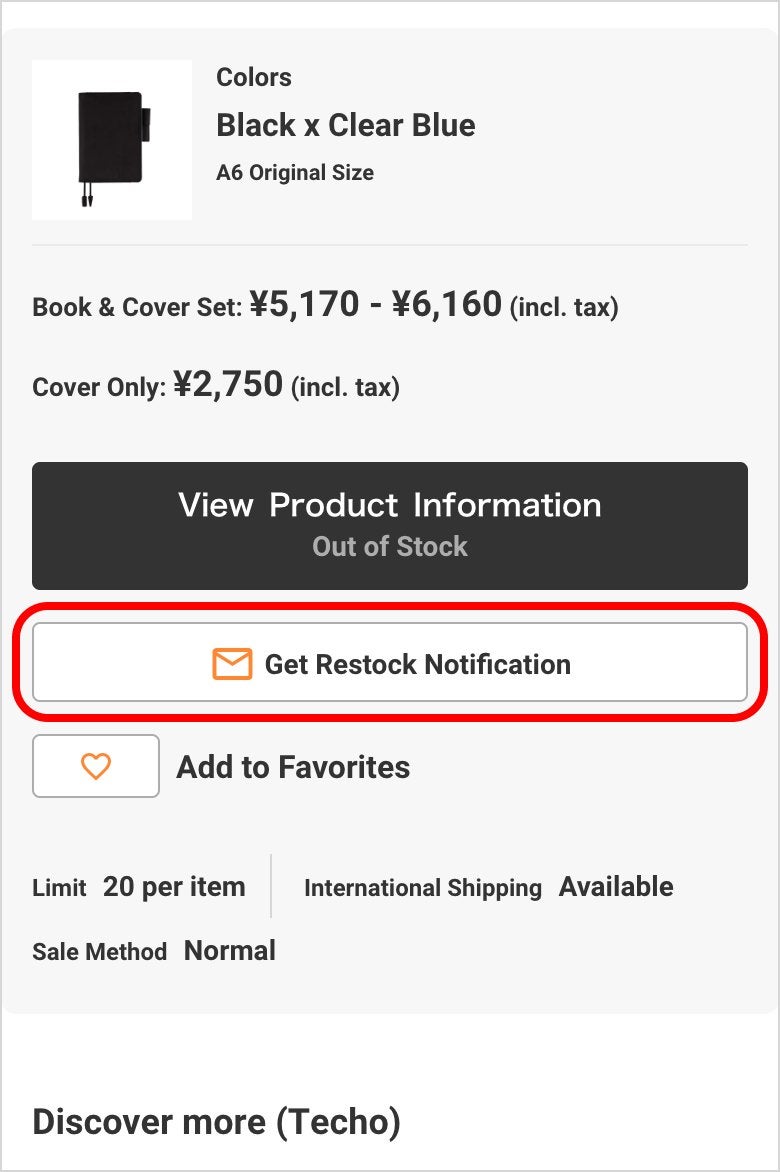
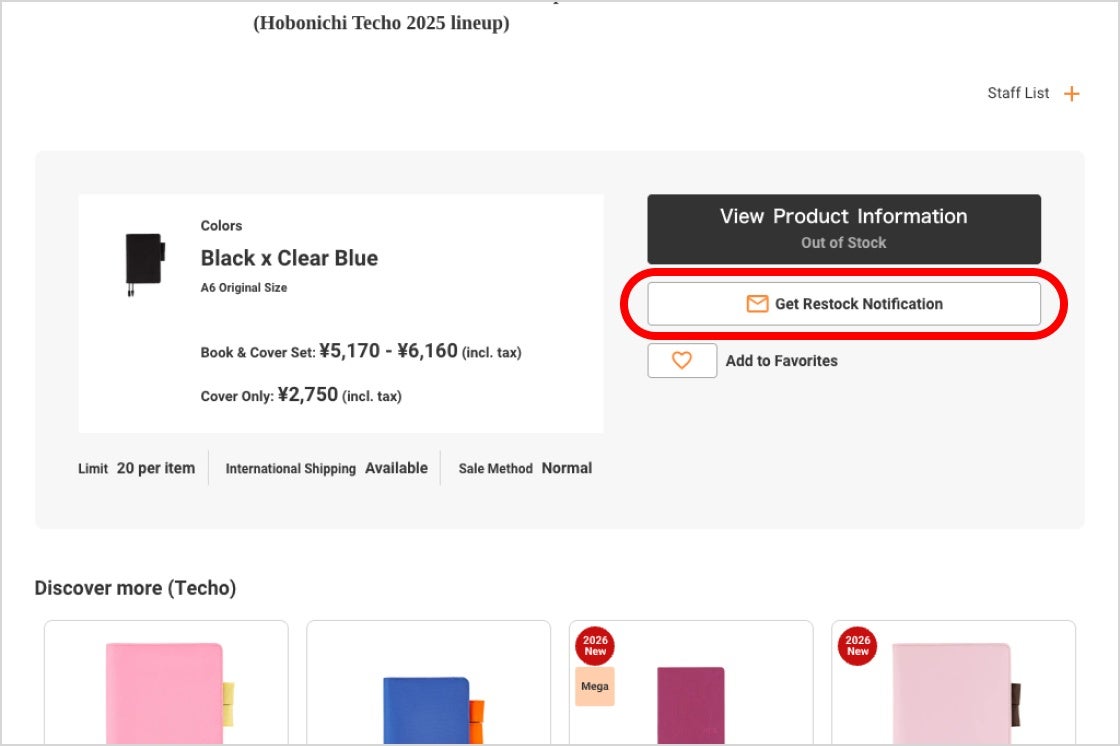
When a product is sold out, you can sign up to receive a restock notification email. If the product has been confirmed for a restock, you will receive an email notifying you of the planned restock date.
On a Smartphone:
On a Computer:
*This service is only available for the Hobonichi Techo and the Drawer Pouch. Restock notification emails are not available for accessories.
*Restock notification emails are not a guarantee that an item will successfully restock or that you will definitely be able to purchase the item.
*Some high demand products may sell out shortly after the restock is released.
- u4Z8YFlpDn
- Favorites
-
You can add products to your favorites list from the lineup page or individual product pages.
Lineup page
On a smartphone: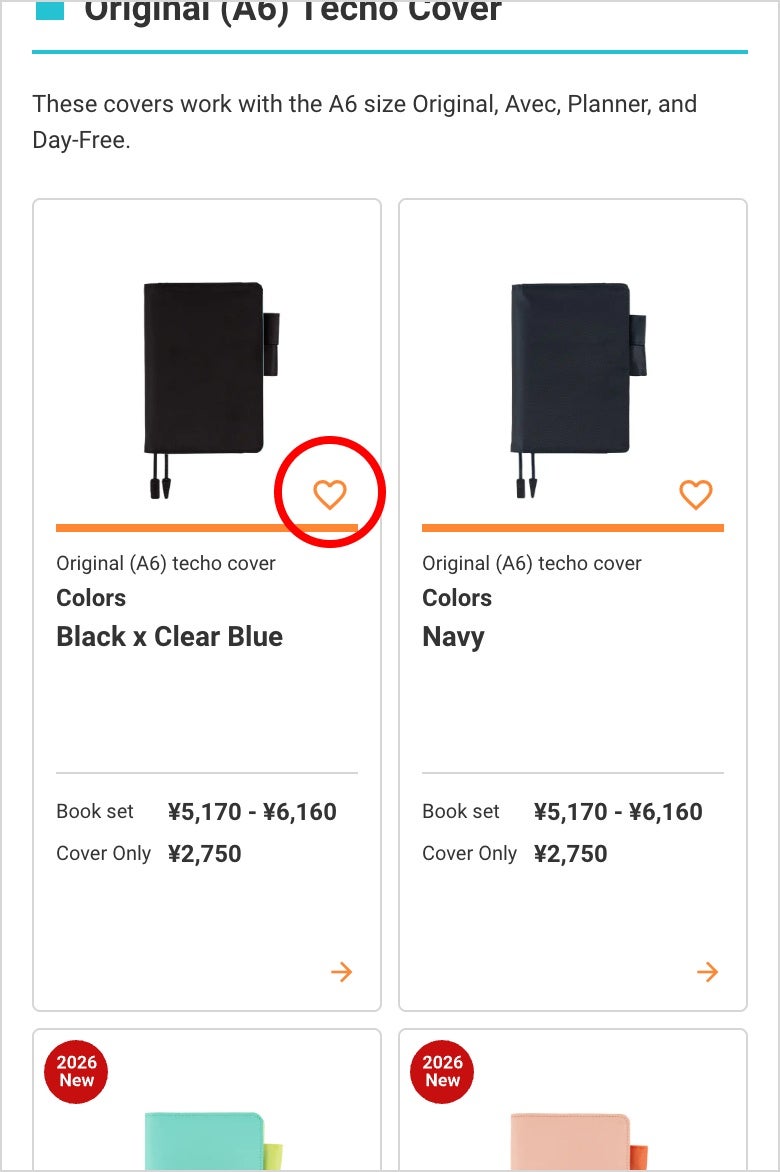
On a computer
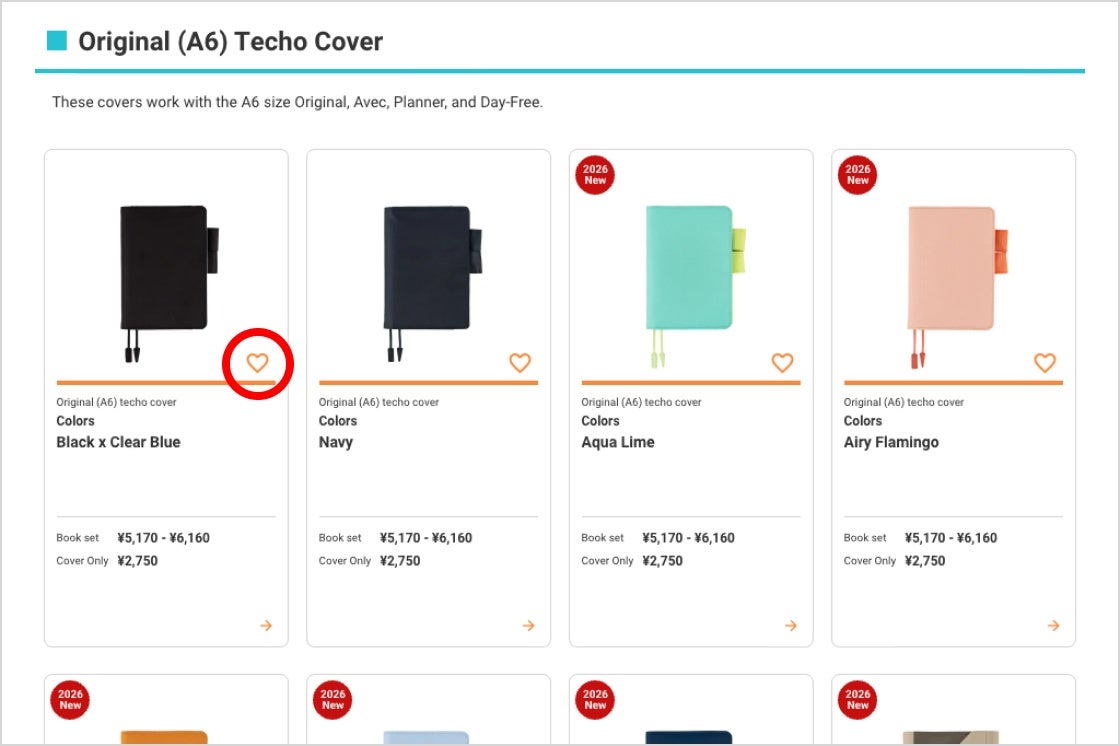
Individual product pages
On a smartphone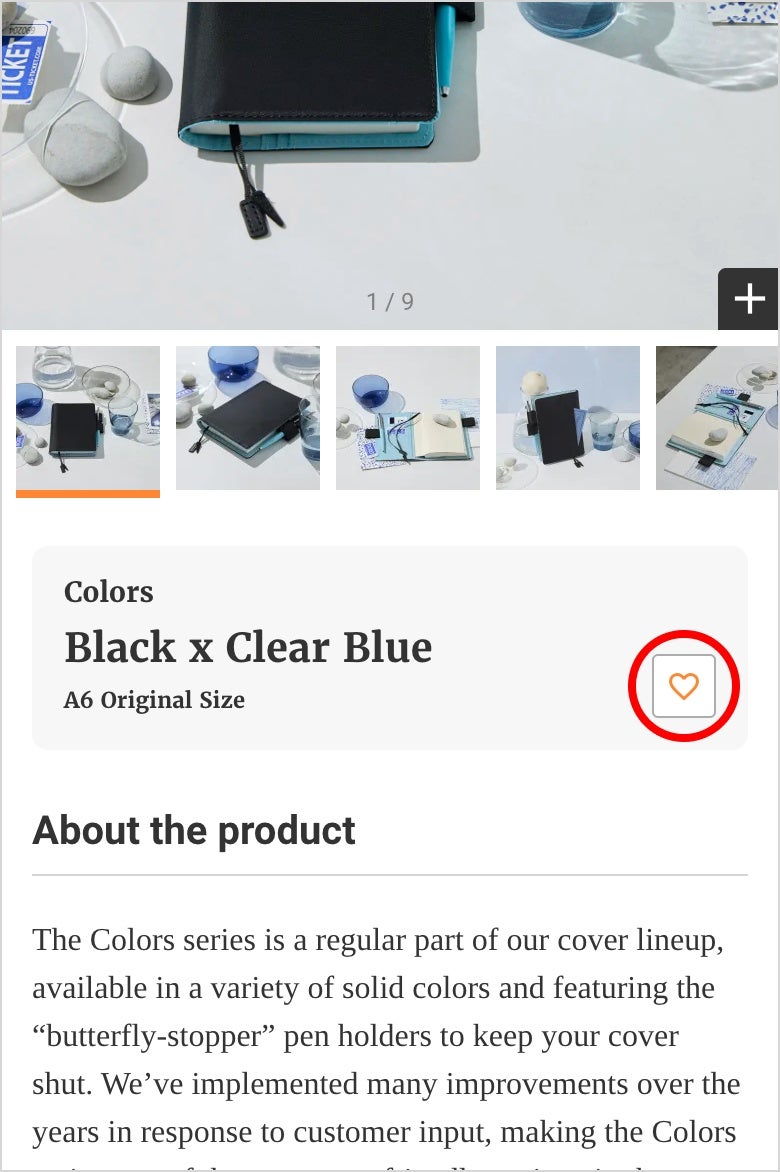
On a computer
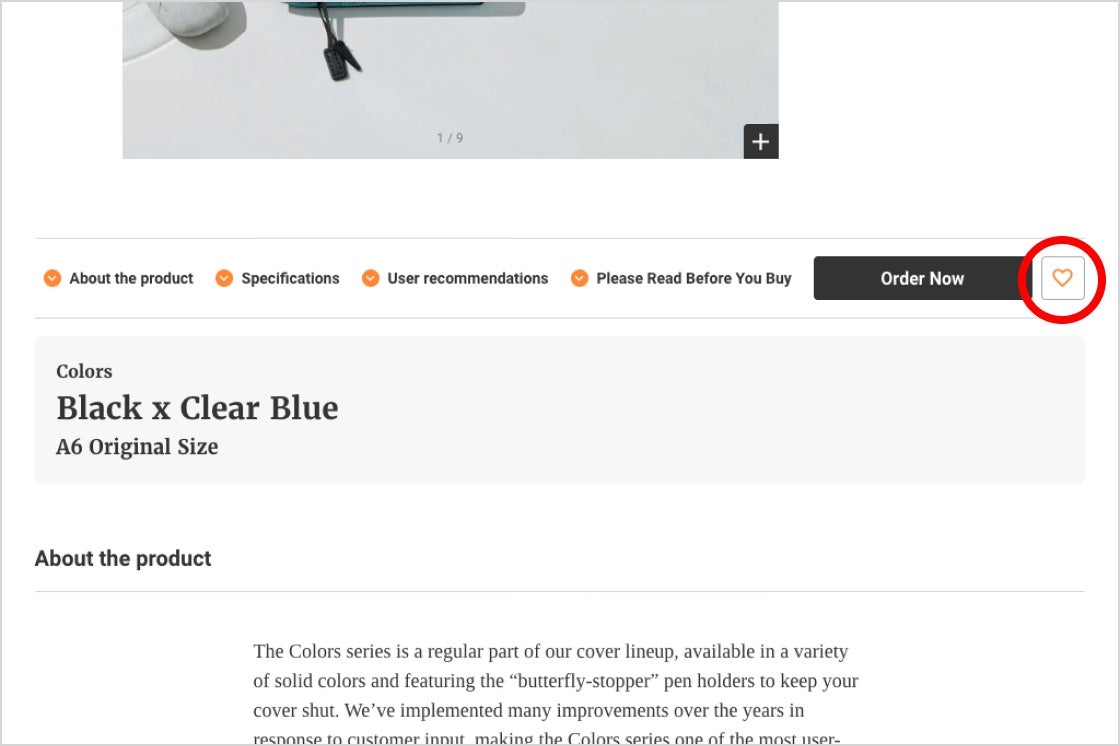
- 3XWM4jH6Jh
- Gift Wrap
-
There are 2 gift wrap services available.
Hobonichi Techo Gift Bag
We’re selling gift bags separately that you can use to wrap gifts yourself. There are two sizes available to accommodate varying gift contents.
Gift wrap
Customers can request a gift box for an additional 660 yen (tax included) per order.The entire order will be placed into the gift box together.

*Gift wrapping is not available if your order includes any items that are ineligible for this service.
*Gift wrapping is not available for orders placed using Amazon Pay.
*We do not offer gift wrapping for international orders (orders shipped outside of Japan).
See here for more information about gift wrap services.
Others
- ZAfwseYJ6y
- Purchasing Outside the Hobonichi Online Store
-
In addition to the Hobonichi Online Store, Hobonichi Techo products are available at official shops, Amazon, and other retailers.
For details on where to purchase, please refer to the “Where to Buy” page.
- fGOqJYZyx8
- Operating System Requirements
-
Here are the following requirements for accessing our website from computers, smartphones, tablets, etc.:
PC
Windows 10:
Chrome latest version
Microsoft Edge latest versionMacOS 10.15 and up
Safari latest version
Chrome latest versionSmartphone, tablet
Android
Android 12.0 and up, Chrome latest versioniPhone、iPad
iOS 16 and up